 Watchletic
Galaxy Watch TrainingPeaks: Sync Structured Workouts
Want to sync a Samsung Galaxy Watch with TrainingPeaks? Watchletic connects the two: it imports your planned TrainingPeaks workouts, puts the structured intervals on your Galaxy Watch, guides you through each step, and can send the completed workout back to TrainingPeaks.
This gives Galaxy Watch TrainingPeaks users the training loop they expect from a dedicated sports watch: plan with a coach or in TrainingPeaks, complete the session from the wrist, then review the result in the same calendar.
Can a Galaxy Watch sync with TrainingPeaks?
Yes. Watchletic for Wear OS acts as the bridge between TrainingPeaks and compatible Samsung Galaxy Watch models. It supports both directions:
- TrainingPeaks to Galaxy Watch: import planned sessions and follow their structured intervals on the watch.
- Galaxy Watch to TrainingPeaks: upload the completed workout as a FIT file, including the recorded route and metrics that are available for that activity.
The TrainingPeaks workout should use the Structured Workout Builder when you want each warmup, work interval, recovery, and cooldown to appear on the watch. Watchletic understands duration- and distance-based steps as well as pace, speed, heart-rate, power, and RPE targets.
How to sync TrainingPeaks workouts to Samsung Galaxy Watch
1. Install Watchletic on your phone and Galaxy Watch
Download Watchletic from Google Play on your Android phone and install its Wear OS app on your Galaxy Watch. Sign in to the same Watchletic account on both devices.
2. Connect TrainingPeaks in Watchletic
Open Watchletic on your phone, go to Integrations, find TrainingPeaks under Explore, and tap it. Sign in to TrainingPeaks and authorize Watchletic to read planned workouts and upload completed workout files.
TrainingPeaks then appears under Connected. Leave Auto-export enabled if you want finished workouts sent back automatically. You can also enable Import heart rate zones when importing workouts if you want Watchletic to use the zones from your TrainingPeaks profile.
3. Import your TrainingPeaks training plan
Tap Import workouts on the TrainingPeaks integration card. Watchletic imports the next seven days of scheduled workouts, starting today. Workout importing is included with Watchletic Club.
If a coach changes an interval session in TrainingPeaks, tap Import workouts again to pull in the latest version before training.
4. Open the workout on your Galaxy Watch
Open Watchletic on your Galaxy Watch while the watch has an internet connection. From the home screen, tap the central Scheduled Workouts button and choose the TrainingPeaks session for today.
You can also open today's session from the Watchletic Tile or a compatible watch-face complication. Review the workout steps, choose indoor or outdoor when available, then tap Continue and start when your sensors are ready.
5. Follow the structured intervals
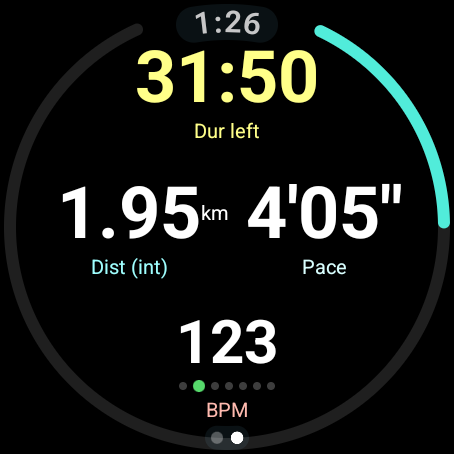
During the workout, Watchletic shows the current interval, progress toward its distance or duration goal, and the target sent by TrainingPeaks. It advances through work and recovery steps and can give alerts for interval changes and target ranges, so you do not need to memorize the session.
Watchletic can also connect directly to supported Bluetooth sensors. For example, you can connect a heart-rate strap to a Samsung Galaxy Watch and use that reading during the workout.
6. Sync the completed Galaxy Watch workout back to TrainingPeaks
End and save the workout on the watch. With Auto-export enabled, Watchletic uploads the completed FIT workout to TrainingPeaks. If the watch is temporarily offline, Watchletic keeps the workout in its export queue so you can retry when a connection is available.
The completed activity then appears alongside the planned session in TrainingPeaks, ready for you or your coach to review.
Compatible Samsung Galaxy Watch models
Watchletic requires Wear OS 5 or newer. Supported Galaxy Watch families include:
- Galaxy Watch4 and Watch4 Classic
- Galaxy Watch5 and Watch5 Pro
- Galaxy Watch6 and Watch6 Classic
- Galaxy Watch FE
- Galaxy Watch7 and Galaxy Watch Ultra
- Galaxy Watch8 and Watch8 Classic
- Galaxy Watch9
- Galaxy Watch Ultra2
Make sure an older compatible watch has received its Wear OS 5 update. The Galaxy Watch3, Galaxy Watch Active2, and earlier Tizen-based models cannot run the Watchletic Wear OS app. Samsung confirms that Galaxy Watch4 and newer models use Wear OS and officially announced the Galaxy Watch9 and Galaxy Watch Ultra2 on July 22, 2026.
For a broader look at workout layouts, Health Connect, Tiles, complications, Bluetooth sensors, and FIT export, see Watchletic for Wear OS.
If a TrainingPeaks workout is not showing on your Galaxy Watch
Check these points:
- Confirm the date. Watchletic imports a seven-day window starting today, so sessions farther into the future will not appear yet.
- Import again. In the phone app, open Integrations, find TrainingPeaks, and tap Import workouts.
- Use a supported sport. TrainingPeaks imports currently cover running, walking, cycling, swimming, and cross-country skiing.
- Build the intervals in TrainingPeaks. A workout needs a structured workout file for all steps and targets to transfer. A session with only planned time or distance imports as a simpler workout.
- Open Watchletic on the watch while online. This lets the Galaxy Watch fetch the latest workouts from your Watchletic account.
- Check the account. The phone and watch must be signed in to the same Watchletic account.
Galaxy Watch and TrainingPeaks FAQ
Do I need Samsung Health to sync TrainingPeaks workouts?
No. The planned workout moves from TrainingPeaks to Watchletic and then to the Watchletic Wear OS app. Completed workouts can also be written to Health Connect, but Health Connect is separate from the TrainingPeaks connection.
Can I use TrainingPeaks workouts on a Galaxy Watch Ultra or Ultra2?
Yes. The Galaxy Watch Ultra and Galaxy Watch Ultra2 run Wear OS and are supported by Watchletic. The same workflow also applies to the Galaxy Watch9 and other supported Wear OS Galaxy Watch models.
Will the completed workout upload to TrainingPeaks automatically?
Yes, when Auto-export is enabled on the TrainingPeaks integration. You can see pending exports on the Watchletic watch home screen and retry an upload if the watch was offline.
Does this work for workouts from a TrainingPeaks coach?
Yes. A coach-planned session on your TrainingPeaks calendar can be imported in the same way. If it was created as a structured workout, its individual steps and targets transfer to Watchletic.
Can I sync TrainingPeaks with an older Tizen Galaxy Watch?
No. Watchletic's watch app requires Wear OS 5 or later, so it does not run on Galaxy Watch3, Galaxy Watch Active2, or older Tizen watches.
With Watchletic, the Galaxy Watch and TrainingPeaks work together as one connected training system: your plan arrives on your wrist, the watch guides the session, and the result returns to your TrainingPeaks calendar.
Download Watchletic from Google Play.
For watch requirements, sensor pairing, and related watch models, see the TrainingPeaks on Galaxy Watch setup page.


It's free to get started.
Related articles
Connect a Heart Rate Strap to Samsung Galaxy Watch Ultra
Samsung Health does not offer a way to use a Bluetooth chest strap as the heart-rate source for a workout. Watchletic does. Here is how to connect a supported Bluetooth heart-rate monitor to a Galaxy Watch Ultra.
Read more
DFA alpha 1 on Samsung Galaxy Watch with Watchletic
DFA-a1 on Samsung Galaxy Watch needs a heart-rate monitor that sends R-R intervals and an app that records them. Watchletic can show it live and export it in FIT files.
Read more