 Watchletic
Watchletic integration
Runna on Google Pixel Watch
Import planned runs from your Runna calendar, follow the intervals in Watchletic, and return completed runs through Strava.

Scheduled-workout imports require Watchletic Club.
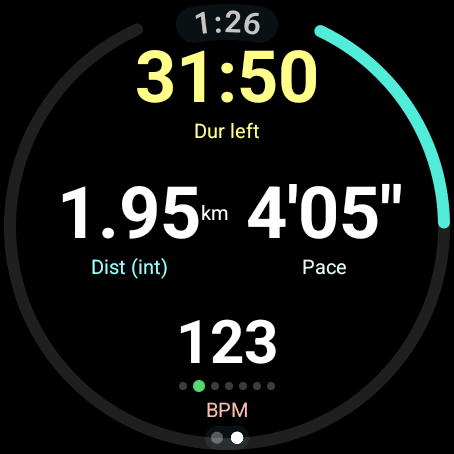
Follow your Runna plan in Watchletic
Watchletic imports planned runs through Runna’s calendar connection. Open the imported session on your watch to follow its workout steps and supported targets. You can connect Stryd or a Bluetooth heart-rate monitor while running the session in Watchletic.
A Pixel Watch run can use an external Bluetooth chest strap for heart rate and Stryd for running power. Watchletic displays those values alongside the current workout step.
Set up Runna on Google Pixel Watch
Install Watchletic on your Android phone and Google Pixel Watch from Google Play. Connect your account or calendar in the Android app, then use Watchletic on Pixel Watch to record the session.
- In Runna, open Profile → Connected Apps & Devices → Connect Calendar → Other Calendar, then copy the calendar URL.
- In the Watchletic phone app, open the Runna connection and paste the calendar URL to import planned runs.
- Open the imported workout in Watchletic on your watch. Check its steps and targets before starting; some Runna workout instructions may not be supported yet.
- To return completed runs, connect Watchletic to Strava and connect Strava in Runna. Watchletic exports the run to Strava, and Runna imports it from there.
The return path is Watchletic → Strava → Runna. Which sensor fields Runna displays depends on what it imports from Strava.
Bluetooth devices for Runna workouts
Yes, you can follow a Runna workout in Watchletic with Stryd connected. Connect devices directly in Watchletic on Google Pixel Watch. Add each device before starting the workout and choose the values you want on screen.
- Stryd and Stryd Duo supply running power, pace, distance, cadence, and running dynamics.
- Bluetooth heart-rate monitors, including Polar H10 and compatible Wahoo straps, supply live heart rate. Monitors that broadcast R-R intervals also enable HRV and DFA-a1.
- CORE supplies body temperature and heat strain. Tymewear VitalPro supplies breathing rate, tidal volume, minute ventilation, and inhale/exhale ratio.
- Compatible treadmills and NPE Runn supply indoor running data. ActiveLook/ENGO glasses show live Watchletic workout fields.
- Bluetooth cycling power meters, speed and cadence sensors, and compatible smart trainers connect directly for rides on both platforms.
Connect a Polar H10, Stryd, or another supported sensor in Watchletic’s Bluetooth settings on Pixel Watch. The sensor supplies live data to the Watchletic workout on your wrist.
Available metrics depend on the device and firmware. Each service controls which fields it displays after upload. See the device compatibility table for supported metrics and watch models. Use Bluetooth devices; Watchletic does not connect over ANT+.
Google Pixel Watch compatibility
Google Pixel Watch needs Wear OS 5 or later. Record in Watchletic to use its structured workouts and Bluetooth connections, and save the result to Health Connect through the Android app.
Questions about this connection
How do I use Runna on Google Pixel Watch?
Install Watchletic on your Android phone and Google Pixel Watch from Google Play. Connect your account or calendar in the Android app, then use Watchletic on Pixel Watch to record the session. Import planned runs from your Runna calendar, follow the intervals in Watchletic, and return completed runs through Strava.
Can I use Stryd with an imported Runna workout?
Yes. Pair Stryd directly in Watchletic on your watch, then start the imported Runna session in Watchletic. You can record Stryd running power and dynamics while following the session’s supported targets.
Does Watchletic send my run back to Runna?
Completed runs go through Strava. Connect Strava in both Watchletic and Runna: Watchletic exports the run to Strava, and Runna imports it from Strava.
Runna on your watch
Other integrations: Smashrun · Tymewear · TrainingPeaks · Stryd.
It's free to get started.