 Watchletic
Using Stryd on Apple Watch
Stryd has an official Apple Watch app. Watchletic is another option if you want Stryd's running metrics alongside more workout types, target types, and connected training services.
Why use Watchletic with Stryd?
You may train by power one day and pace, heart rate, or RPE the next. Watchletic can use Stryd data with any of those targets and can import structured workouts from other services.
With Watchletic, you can connect your Stryd pod and still build or follow workouts using these target types:
- Pace
- Pace Splits
- Speed
- BPM
- Heart Rate Zone
- Running Power
- RPE
The workout keeps its chosen target while Stryd supplies the supported running metrics.
What data comes from Stryd?
Once Stryd is connected to Watchletic, the following running metrics are taken from Stryd instead of Apple Watch and written to Apple Health:
- running power
- pace
- vertical oscillation
- ground contact time
- stride length
- distance
That means your workout can use Stryd-backed values while you still stay inside the Watchletic workflow on Apple Watch.
Extra Stryd metrics in Watchletic
Watchletic also collects and stores additional Stryd metrics that are not written to Apple Health, but are included in exported FIT files:
- form power
- leg spring stiffness
- elevation
- air power
- impact
- humidity
You can use these values for live guidance and keep them for post-workout analysis.
See the data after the run
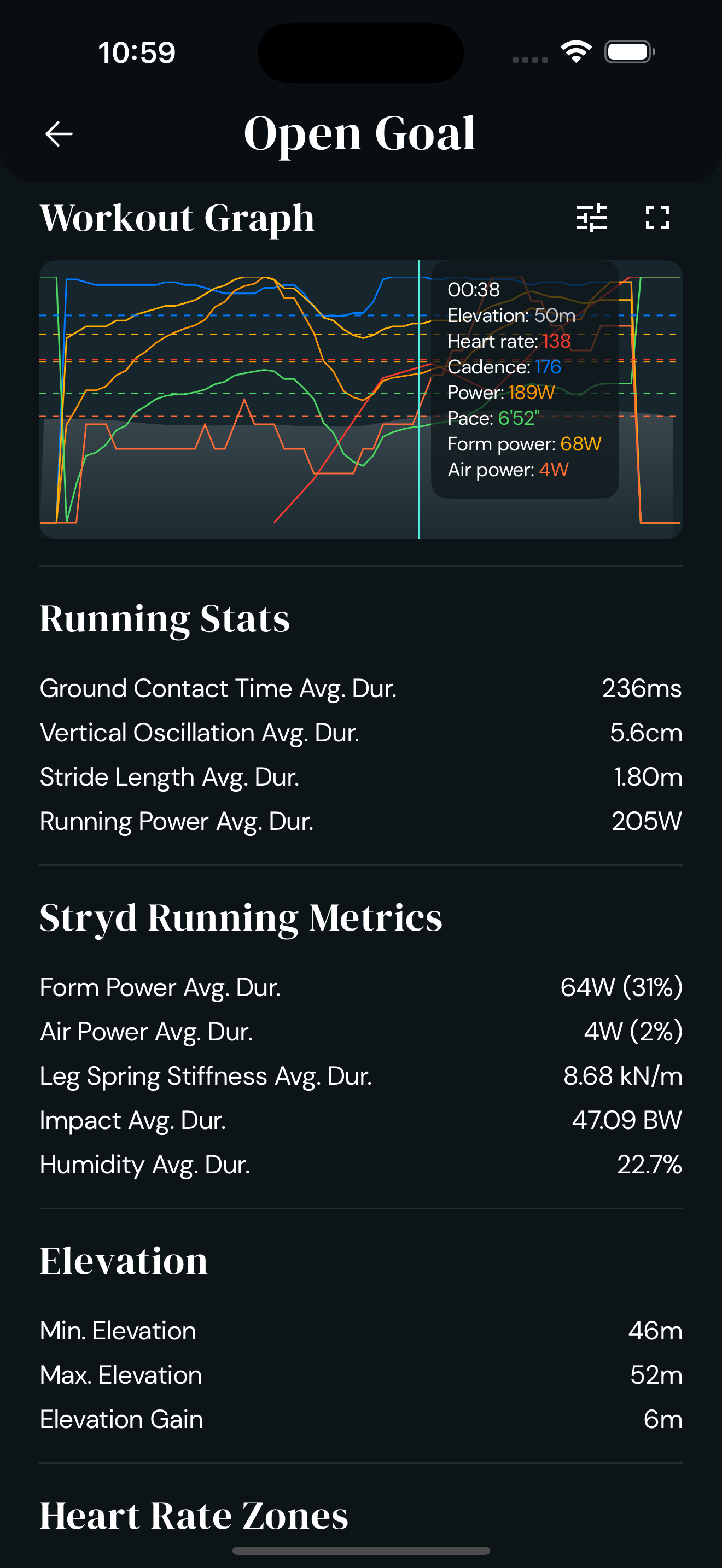
After your workout, Watchletic shows Stryd data both as averages and in the workout graph inside the app.
The graph shows how running power and the extra Stryd-specific metrics changed during the run.
Works with broader training workflows
Watchletic connects with other training services and supports workouts based on power, pace, heart rate, and other targets.
Watchletic also supports importing and exporting workouts with Stryd PowerCenter, so you can keep Stryd as part of your planning and analysis workflow too.
How to connect Stryd
To use Stryd in Watchletic on Apple Watch:
- Open Watchletic on Apple Watch.
- Go to Settings > Bluetooth > Running.
- Press Search and connect your Stryd pod.
- Start your workout from Watchletic.
Once connected, Watchletic will use the supported Stryd metrics during the workout and store the extra Stryd-only metrics for later analysis and exported FIT files.
If you also want to use Stryd with Engo 2, read more here: Use Engo 2 with Stryd on Apple Watch.
For watch requirements, sensor pairing, and related watch models, see the Stryd watch and sensor compatibility pages.


It's free to get started.